May 15, 2026
Website Design vs Website Development: What Should Your Business Prioritize?
Website design and website development are often used like they mean the same thing. They do not.
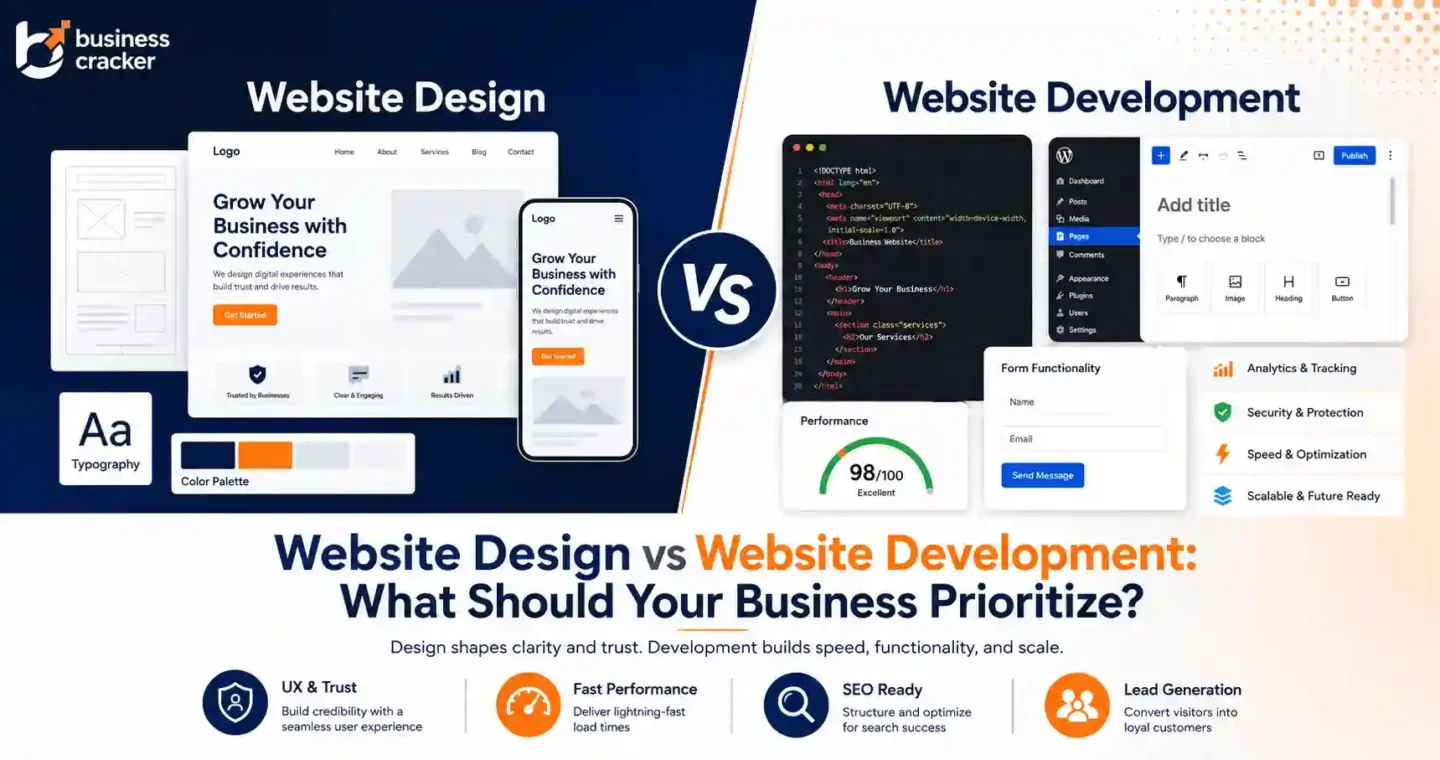
Website design is about how the website looks, how users understand it, how pages are structured, how trust is built, and how visitors are guided toward action. Website development is about how the website is built, coded, managed, secured, loaded, tracked, and maintained.
For a business website, both matter. The mistake is choosing one without understanding the actual problem.
If the website looks outdated, confuses users, and does not explain services clearly, the business has a design problem. If the website loads slowly, breaks on mobile, has poor CMS setup, weak forms, bad redirects, or tracking issues, the business has a development problem. If organic traffic is weak, leads are poor, and paid campaigns are not converting, the issue may involve design, development, SEO, and strategy together.
Current discussions among small business owners, developers, and marketers show the same tension. Many small businesses are choosing DIY builders because they are cheaper and “good enough,” while developers argue that those sites often fail on performance, structure, SEO, and lead generation. Other business owners are asking how much a real lead-generating website should cost, not just a decent-looking one. That is the real question this article answers.
Quick Answer
If your website looks unprofessional, has unclear messaging, weak CTAs, poor layout, or low trust, prioritize website design.
If your website is slow, technically unstable, hard to update, poorly tracked, badly coded, or difficult to scale, prioritize website development.
If your website is not ranking, not converting, or not supporting paid campaigns, review both together. Most business websites need design and development decisions to work with SEO, content, analytics, and conversion goals.
What Is Website Design?
Website design is the planning and visual structure of a website. It focuses on how users experience the page.
Website design includes:
- Layout
- Color system
- Typography
- Visual hierarchy
- Navigation
- Page structure
- CTA placement
- Mobile layout
- Content presentation
- Trust signals
- User flow
- Wireframes
- Landing page structure
- Brand consistency
Good design helps users understand the business quickly.
It answers questions like:
- What does this company do?
- Who is this service for?
- Why should I trust them?
- What problem do they solve?
- What should I do next?
- Is this company credible enough to contact?
A website can be visually attractive and still fail if it does not answer these questions.
That is why professional website design services should not focus only on appearance. The design should support search visibility, trust, usability, and conversions.
What Is Website Development?
Website development is the technical build of a website. It turns design and content into a working website.
Website development includes:
- Front-end development
- Back-end development
- CMS setup
- WordPress website development
- Theme development
- Plugin setup
- Form functionality
- Page speed optimization
- Security setup
- Hosting configuration
- Tracking implementation
- Database structure
- Responsive behavior
- Technical SEO implementation
- Redirects
- Schema setup
- Integrations with tools and CRMs
Development answers a different set of questions:
- Does the website load fast?
- Does it work on all devices?
- Is the CMS easy to update?
- Are forms working?
- Is tracking accurate?
- Are redirects correct?
- Is the site secure?
- Is the code clean enough to maintain?
- Can search engines crawl important pages?
- Can the site support future growth?
A good-looking website with poor development can become expensive to maintain and difficult to scale.
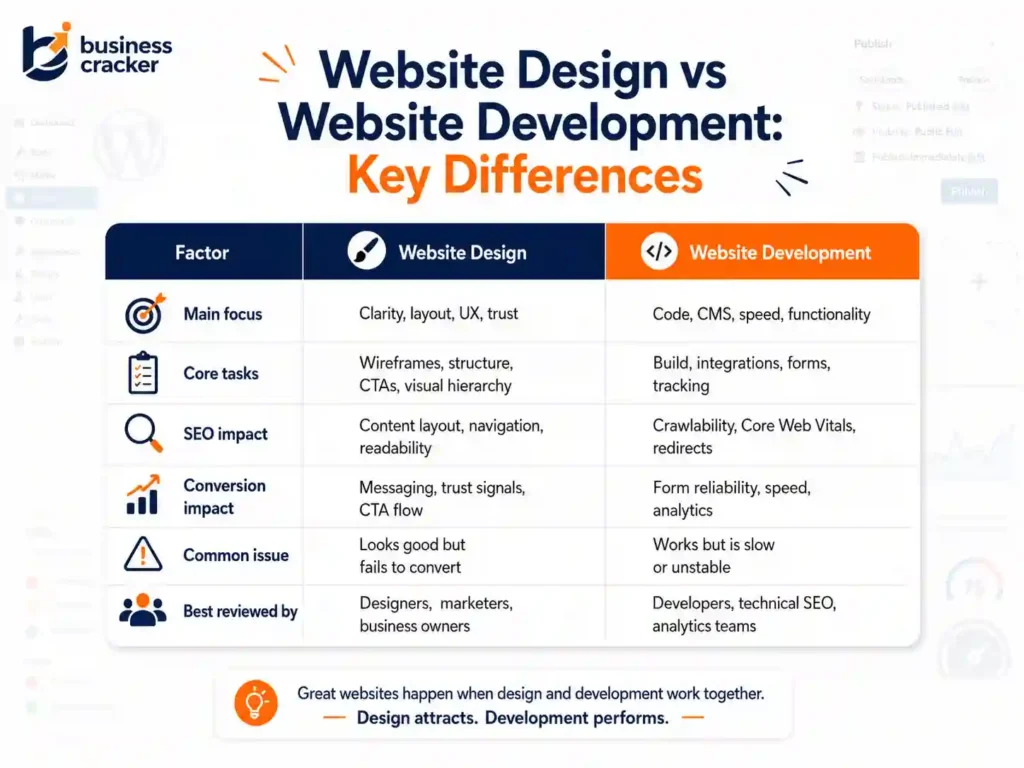
Website Design vs Website Development: Key Differences
| Factor | Website Design | Website Development |
| Main focus | User experience, layout, brand, clarity, conversions | Code, CMS, performance, functionality, integrations |
| Main question | Does the page communicate clearly? | Does the website work properly? |
| Primary output | Wireframes, layouts, page structure, visual system | Working website, templates, CMS, forms, technical setup |
| Business impact | Trust, usability, conversion, brand perception | Speed, stability, security, scalability, tracking |
| SEO impact | Content structure, internal links, readability, UX | Crawlability, indexability, Core Web Vitals, redirects |
| Conversion impact | CTA visibility, trust signals, page flow | Form functionality, tracking, page speed, technical reliability |
| Best reviewed by | Designers, UX specialists, marketers, business owners | Developers, technical SEO specialists, analytics teams |
| Common mistake | Designing for looks only | Building features without user and marketing context |
Why Businesses Confuse Design and Development
Businesses often buy a website as one package. That is normal. But inside the project, design and development solve different problems.
A business owner may say:
“We need a new website.”
But that can mean many things:
- The website looks old
- The website does not get leads
- The website is slow
- The website does not rank
- The website is hard to update
- The website does not support paid campaigns
- The website has broken forms
- The website does not explain the services well
- The website is built on a poor template
- The website has technical SEO issues
Without a diagnosis, the project can go in the wrong direction.
For example, redesigning the homepage will not fix broken conversion tracking. Changing the CMS will not fix weak service page copy. Improving colors will not fix missing redirects. Writing more content will not fix a poor mobile layout.
This is why website planning should start with the business problem, not the tool or visual style.
Why This Matters for SEO
Search engines need to crawl, understand, and index your website. Users need to read, trust, and act on it.
Design and development both affect SEO.
Google’s SEO Starter Guide explains that SEO is about helping search engines understand content and helping users decide whether to visit your site through search results. That means SEO is not only about keywords. It depends on site structure, helpful content, internal links, page experience, and technical accessibility.
Design affects SEO through:
- Heading structure
- Content layout
- Internal linking
- Service page clarity
- Mobile usability
- Readability
- Navigation
- Page depth
- Trust signals
- Conversion paths
Development affects SEO through:
- Crawlability
- Indexability
- Page speed
- Core Web Vitals
- Redirects
- Canonicals
- Structured data
- JavaScript rendering
- Sitemap setup
- Robots rules
- Mobile implementation
If your website needs organic visibility, design and development should be reviewed with SEO services in mind from the start.
Why This Matters for Conversions
A conversion is not only a button click. It is the result of trust, clarity, timing, and technical reliability.
Design helps users decide whether to act.
Development makes sure the action works.
Design conversion issues include:
- Weak headline
- Poor service explanation
- Hidden CTA
- Too many choices
- No proof
- Unclear value proposition
- Poor mobile layout
- Hard to scan content
- Low trust visuals
Development conversion issues include:
- Form not working
- Slow page load
- Tracking not firing
- Error messages failing
- Mobile bugs
- Page layout breaking
- Thank you page missing
- CRM integration failing
- Phone or WhatsApp clicks are not tracked
If a page gets traffic but no inquiries, check both. The issue may not be only design. It may not be only development either.
Website Design vs Website Development: Which Should You Prioritize?
The answer depends on what is broken.
Prioritize Website Design When the Problem Is Clarity
Choose design first when users cannot quickly understand what you offer.
Signs include:
- High traffic but low leads
- Weak homepage message
- Service pages look generic
- CTAs are unclear
- Users do not understand the offer
- Competitors look more credible
- Mobile layout feels cluttered
- Forms are visible but not persuasive
- The brand looks outdated
- Landing pages do not build trust
In this case, development may not be the first issue. The website may work technically but fail to communicate.
Fix:
- Rewrite page messaging
- Improve layout
- Add clearer CTAs
- Improve service page structure
- Add trust signals
- Improve mobile design
- Create better landing page flows
- Make content easier to scan
Prioritize Website Development When the Problem Is Functionality
Choose development first when the website does not work reliably.
Signs include:
- Pages load slowly
- Forms break
- Tracking is missing
- Website is hard to update
- Plugins conflict
- Mobile layout breaks
- Security issues appear
- Checkout or booking flow fails
- Redirects are wrong
- Search engines cannot access key pages
- The website depends on fragile custom fixes
In this case, a visual redesign may not solve the root problem.
Fix:
- Improve code quality
- Optimize performance
- Fix forms
- Clean CMS setup
- Repair tracking
- Improve hosting
- Fix redirects
- Test mobile behavior
- Implement technical SEO basics
- Reduce unnecessary plugins
Prioritize Both When the Website Does Not Support Growth
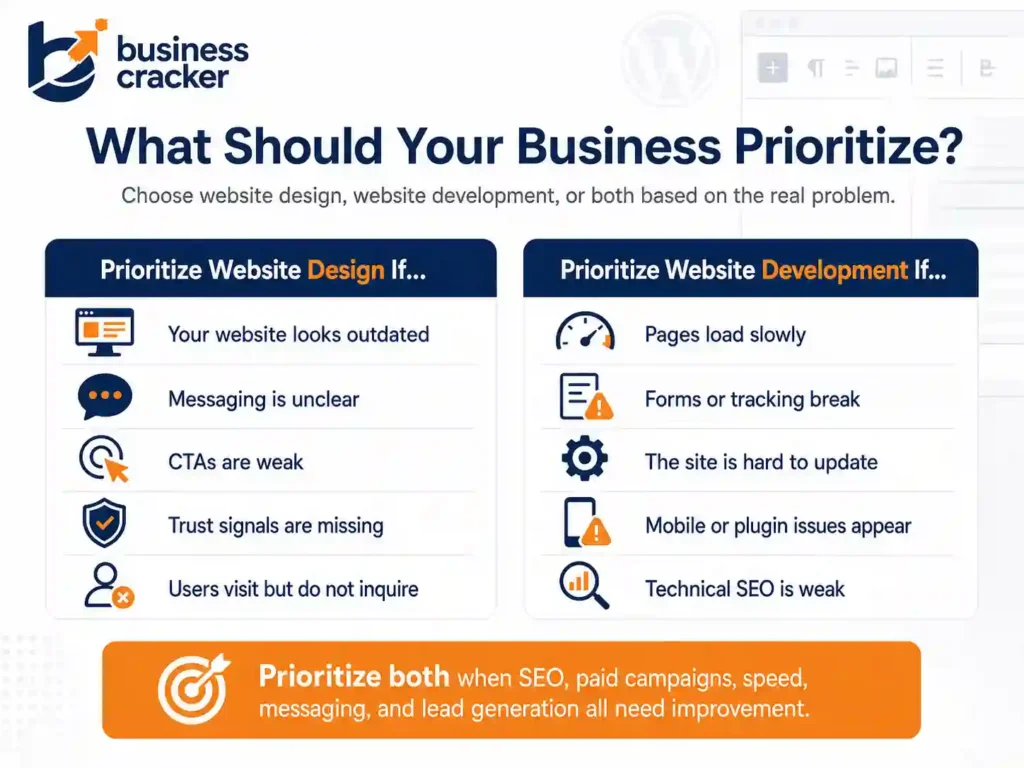
Most serious business website problems are mixed.
Prioritize both when:
- SEO is weak
- Paid campaigns are not converting
- The website looks outdated and loads slowly
- Service pages are unclear and technically weak
- The site needs a migration or redesign
- Tracking is unreliable
- Mobile experience is poor
- Lead quality is low
- The business is rebranding
- The website is being rebuilt on WordPress or another CMS
This is when web design, development, SEO, and conversion planning should be handled together.
Business Cracker approaches websites as part of broader digital marketing services because a website should support visibility, trust, lead generation, paid campaigns, and long-term growth.
The WordPress Factor
For many business websites, WordPress is still a practical choice because it gives teams flexibility over pages, blogs, service content, plugins, SEO settings, and future updates.
W3Techs reported that WordPress was used by 41.9 percent of all websites and held a 59.5 percent CMS market share as of May 15, 2026. That scale makes WordPress familiar to business owners, marketers, developers, and SEO teams.
But WordPress website development still needs good planning.
A WordPress site can perform well when:
- The theme is lightweight
- Plugins are controlled
- Pages are structured properly
- Images are optimized
- SEO settings are configured
- Forms and tracking work
- Hosting is suitable
- The CMS is easy to update
- Security and backups are managed
A WordPress site can perform badly when:
- Too many plugins are installed
- The theme is bloated
- Page builder output is heavy
- Images are oversized
- Forms are unreliable
- Tracking is added carelessly
- Technical SEO settings are ignored
- Service pages are thin
- Mobile layouts are not tested
WordPress is not the strategy. It is the platform. The outcome depends on design, development, content, and maintenance quality.
Website Redesigns Need SEO Planning
A redesign is one of the most common times businesses damage SEO without realizing it.
Google’s site move documentation explains how URL changes should be handled to reduce negative impact on Google Search. This includes careful planning when URLs change, such as moving from one structure to another or changing domains.
During a redesign, businesses often change:
- URLs
- Page titles
- Headings
- Internal links
- Content sections
- Navigation
- Images
- Templates
- CMS structure
- Schema
- Redirects
- Tracking
If these are changed without a plan, organic traffic can drop.
Before redesigning, review:
- Which pages currently get organic traffic
- Which pages have backlinks
- Which URLs are indexed
- Which keywords bring impressions
- Which pages generate leads
- Which internal links support important pages
- Which redirects are needed
- Which content must be preserved
- Which tracking events must stay active
A redesign should improve the website without destroying existing SEO value.
Design Decisions That Affect Development
Design can create technical problems if it is not planned properly.
Examples:
- Large hero images can slow LCP
- Heavy animations can affect interactivity
- Complex layouts can create mobile issues
- Video backgrounds can increase load time
- Custom fonts can slow rendering
- Long pages can become hard to maintain
- Too many visual sections can make CMS editing difficult
- Forms placed inside complex scripts can affect tracking
Good design should be buildable, fast, responsive, and maintainable.
A design that looks good in a mockup but performs badly on real devices is not a good business design.
Development Decisions That Affect Design
Development can also weaken design if implementation is careless.
Examples:
- Poor spacing on mobile
- Broken font rendering
- Low-quality image compression
- Buttons not matching the design system
- Forms styled inconsistently
- Layout shifts during loading
- Sections collapsing incorrectly
- CMS limitations are forcing weak layouts
- Accessibility issues affecting readability
- Slow scripts are making the page feel unpolished
A developer should not only “make it work.” The implementation should preserve the design intent and user experience.
Page Speed Sits Between Design and Development
Page speed is not only a technical issue. It is a design and development issue.
Google’s Core Web Vitals measure real-world user experience for loading performance, interactivity, and visual stability. Google recommends that site owners achieve good Core Web Vitals for success with Search and for a better user experience.
Design affects speed through:
- Image choices
- Video use
- Animation
- Layout complexity
- Font selection
- Visual effects
- Section length
Development affects speed through:
- Code quality
- Hosting
- Caching
- Script loading
- CSS handling
- Image delivery
- Plugin control
- Database performance
- Third-party scripts
If speed is poor, do not ask only the developer to “make it faster.” Review what the design is asking the browser to load.
Design and Development for SEO Pages
Service pages, blog posts, case studies, and contact pages each need different design and development decisions.
Service Pages
Service pages should explain:
- What the service is
- Who it is for
- What problems does iit solve
- What is included
- Process
- Proof
- FAQs
- CTA
Design should make the content easy to scan.
Development should make the page fast, indexable, trackable, and editable.
Blog Posts
Blog posts should be readable and internally linked.
Design should support:
- Clear headings
- Short paragraphs
- Related articles
- CTA sections
- Author information
Development should support:
- Clean templates
- Article schema
- Fast loading
- Mobile readability
- Table of contents if needed
- Internal link modules
Case Studies
Case studies should show credibility.
Design should support:
- Client type
- Problem
- Strategy
- Work done
- Outcome
- Services used
- CTA
Development should support:
- Reusable templates
- Structured content fields
- Proper internal links
- Fast media loading
Contact Pages
Contact pages should reduce friction.
Design should support:
- Clear form
- Contact details
- Trust signals
- Location or service area if relevant
- Short expectation setting
Development should support:
- Working forms
- Spam protection
- Tracking
- Email delivery
- CRM integration if needed
What Marketers Should Care About
Marketers should not treat web design and development as purely creative or technical tasks.
They should ask:
- Does the page match the campaign message?
- Does the service page support search intent?
- Does the CTA match the visitor stage?
- Can users understand the offer quickly?
- Is the page ready for paid traffic?
- Can we track conversions properly?
- Are internal links helping users move to the next page?
- Does the website support SEO and ads together?
A good website should make marketing easier, not harder.
What SEO Experts Should Care About
SEO experts should be involved before a redesign or development change goes live.
They should check:
- URL structure
- Redirects
- Canonicals
- Meta titles
- H1s and headings
- Internal links
- Indexability
- Schema
- Page speed
- Mobile rendering
- Content placement
- Blog and service page templates
- Sitemap and robots rules
SEO should not be added at the end. By then, the important design and development decisions may already be locked.
What Software Engineers Should Care About
Software engineers should understand how design and SEO requirements affect implementation.
They should check:
- Semantic HTML
- Accessible markup
- Mobile behavior
- Performance budgets
- Script loading
- Form stability
- Event tracking
- CMS editing experience
- Redirect logic
- Error handling
- Reusable components
- Security
- Maintainability
Good development supports future marketing changes without rebuilding everything.
What Business Managers Should Care About
Business managers should focus on outcomes.
Ask:
- Is the website generating leads?
- Are users reaching the right pages?
- Are forms working?
- Is organic visibility improving?
- Are paid campaigns converting?
- Can the team update the site easily?
- Is the website scalable?
- Are we measuring the right actions?
- Are we protecting existing SEO value during changes?
A website should not be judged only by whether people like the design. It should be judged by whether it supports business goals.
Common Mistakes Businesses Make
Mistake 1: Paying Only for Looks
A beautiful website can still fail if it has weak content, poor structure, slow speed, and no conversion path.
Mistake 2: Ignoring Development Quality
Cheap builds often become expensive later when the business needs changes, tracking, speed fixes, or SEO improvements.
Mistake 3: Redesigning Without SEO Review
Changing URLs, titles, content, or internal links without an SEO plan can hurt organic visibility.
Mistake 4: Choosing a Platform Before Defining Needs
Do not choose WordPress, Shopify, Webflow, Wix, or custom development before defining goals, content needs, team skills, and scalability requirements.
Mistake 5: Treating Mobile as an Afterthought
Mobile layout should be reviewed early, not after desktop design is approved.
Mistake 6: Building Without Tracking
A website that cannot measure leads, calls, clicks, and form submissions gives the business incomplete data.
Mistake 7: Separating Design, SEO, and Development
These areas need to work together. Treating them as separate tasks creates gaps.
Practical Decision Framework
Use this framework before starting a website project.
Step 1: Identify the Main Problem
Choose the closest statement:
- The site looks outdated
- The site does not explain services well
- The site is slow
- The site does not rank
- The site gets traffic but no leads
- The site is hard to update
- The site breaks often
- The site cannot support campaigns
- The site needs a full rebuild
This tells you where to start.
Step 2: Audit the Current Website
Review:
- Homepage
- Service pages
- Blog
- Case studies
- Contact page
- Mobile version
- Page speed
- Search Console data
- Analytics data
- Form submissions
- Technical SEO
- Internal links
Do not redesign blindly.
Step 3: Define the Website Goal
Examples:
- Generate service inquiries
- Improve SEO visibility
- Support paid campaigns
- Improve trust
- Improve mobile experience
- Make content easier to publish
- Support a new brand position
- Improve conversion tracking
The goal determines design and development priorities.
Step 4: Map Required Pages
For a service business, a basic structure may include:
- Homepage
- Services page
- Individual service pages
- Blog
- Case studies
- About page
- Contact page
- Privacy policy
Each page should have a clear role.
Step 5: Decide What to Prioritize
Prioritize design if clarity, trust, and conversion are weak.
Prioritize development if performance, functionality, CMS, or tracking are weak.
Prioritize both if the website affects SEO, paid campaigns, and lead generation.
Website Design and Development Checklist
Design Checklist
- Is the homepage message clear?
- Are services easy to understand?
- Is the CTA visible?
- Is the mobile layout clean?
- Are trust signals present?
- Is the content easy to scan?
- Is the visual hierarchy clear?
- Are forms easy to use?
- Does the design support SEO content?
- Does the page guide users toward action?
Development Checklist
- Is the site fast?
- Is it mobile responsive?
- Is the CMS easy to update?
- Are forms working?
- Is tracking implemented?
- Are redirects correct?
- Are the pages indexable?
- Are plugins controlled?
- Is security handled?
- Is the code maintainable?
SEO Checklist
- Are important pages crawlable?
- Are URLs clean?
- Are titles and H1s optimized?
- Are internal links in place?
- Is the schema implemented where useful?
- Are service pages detailed enough?
- Are blog pages linked properly?
- Are Core Web Vitals reviewed?
- Is the sitemap correct?
- Is Search Console connected?
Conversion Checklist
- Is the offer clear?
- Is the CTA specific?
- Is the proof visible?
- Is the form short enough?
- Is the next step clear?
- Are phone or WhatsApp clicks trackable?
- Is there a trust signal near the CTA?
- Are users given enough information before contact?
- Is the page aligned with paid campaigns?
How Business Cracker Looks at Website Projects
Business Cracker treats website design and development as part of business growth, not as isolated website work.
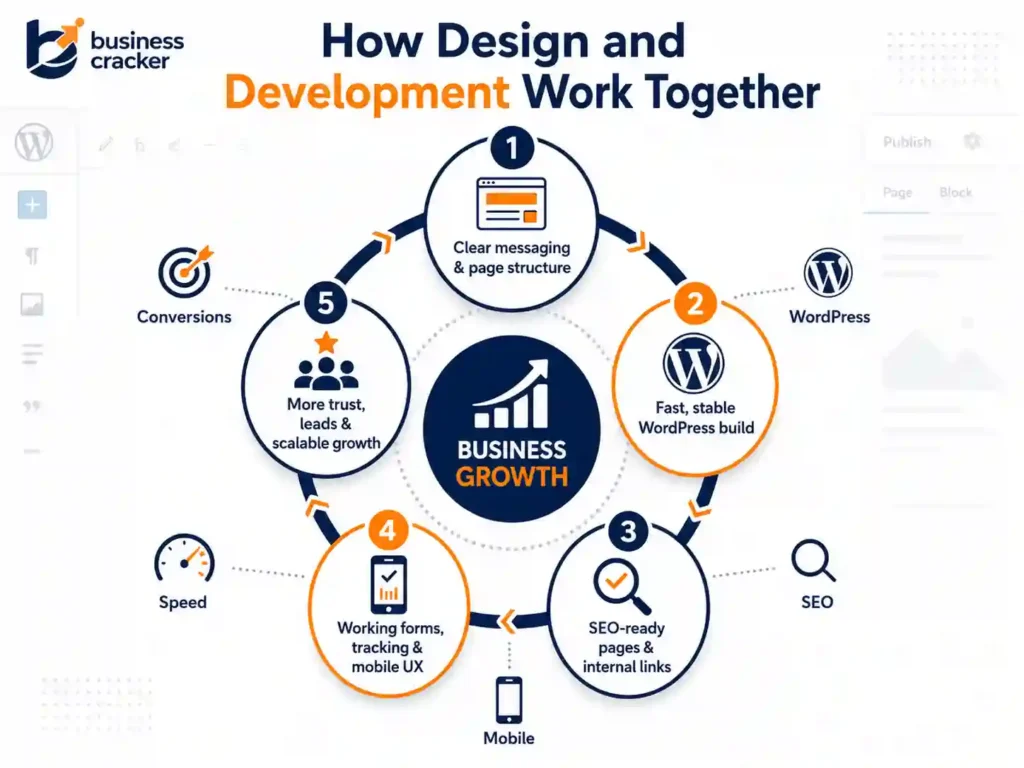
A good website should support:
- Search visibility
- Clear service positioning
- Fast loading
- Mobile usability
- Lead generation
- Paid campaign readiness
- Internal linking
- Tracking
- Trust
- Long-term maintenance
That means a website project should not start with colors or code. It should start with business goals, audience needs, service clarity, SEO requirements, and conversion paths.
Final Thoughts
Website design and website development solve different problems, but a business website needs both to work together.
Design helps users understand the offer, trust the business, and take action. Development makes the website fast, stable, secure, trackable, and scalable. SEO connects both by making sure the right pages can be found, understood, and ranked.
If your website looks good but does not generate leads, review the design, messaging, CTAs, and trust signals. If your website is slow, hard to update, or technically unstable, review development quality. If your website needs to support SEO and paid campaigns, review the full system before investing in another redesign.
For a practical review of your website structure, design quality, SEO readiness, WordPress setup, and conversion path, contact Business Cracker.
Frequently Asked Questions
What is the difference between website design and website development?
Website design focuses on layout, user experience, visual structure, branding, content flow, and conversion paths. Website development focuses on coding, CMS setup, speed, security, forms, tracking, integrations, and technical functionality.
Which is more important, website design or website development?
Both are important. Website design helps users understand and trust the business. Website development makes sure the website works properly, loads fast, tracks actions, and can be maintained. The priority depends on what is currently broken.
Should I redesign my website or rebuild it?
Redesign if the main issue is messaging, layout, trust, or conversion flow. Rebuild if the website has technical limitations, poor CMS setup, slow speed, broken functionality, or major development problems. Many projects need both.
Is WordPress good for business website development?
WordPress can be a good choice for business websites because it is flexible, widely used, and easy for teams to manage when built properly. It works best when the theme is lightweight, plugins are controlled, and SEO, speed, and security are planned from the start.
Can website design affect SEO?
Yes. Website design affects SEO through page structure, navigation, headings, content visibility, internal links, mobile usability, speed, and user experience. A design that hides content, slows pages, or weakens internal links can hurt SEO performance.
Can website development affect conversions?
Yes. Development affects conversions through page speed, form functionality, mobile behavior, tracking, error handling, and technical stability. If the form breaks or the page loads slowly, users may leave even if the design looks good.