April 26, 2026
On-Page SEO Checklist for Business Websites
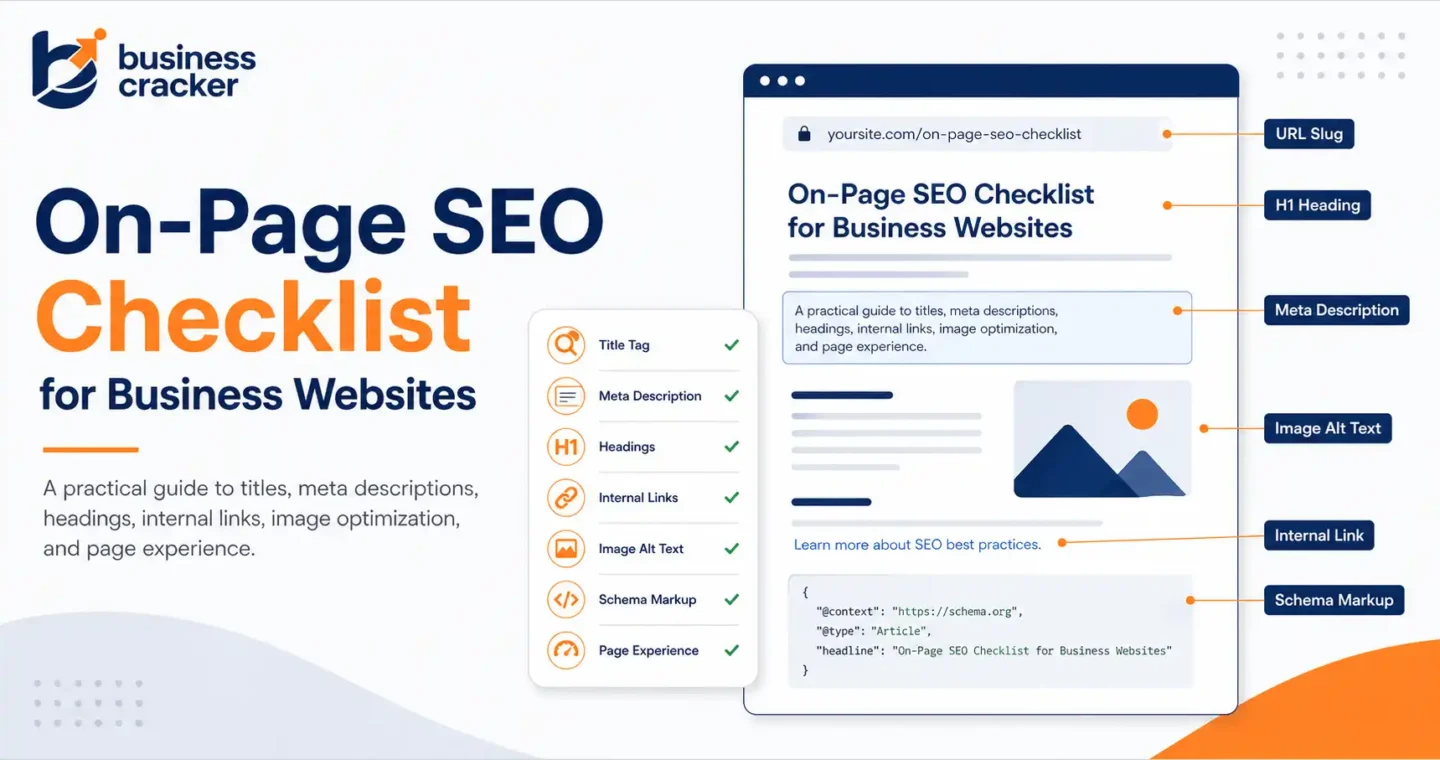
On-page SEO is the work you do on a specific page to help search engines and users understand what that page is about, why it is useful, and which search intent it should satisfy. It covers the page title, meta description, headings, content depth, internal links, image optimization, URL structure, schema, and page experience. This On-Page SEO Checklist can guide your optimization efforts effectively.
That sounds simple, but most business websites do not fail because one keyword is missing from the H1. They fail because the page is unclear. The page tries to target too many intents, the title promises one thing while the content delivers another, internal links point to weak or competing pages, and the meta description is either missing, duplicated, or written only for keywords.
Recent discussions across SEO communities show the same problems repeatedly. People are still dealing with keyword cannibalization, duplicate pages, unclear title and meta description strategy, and pressure to show SEO results quickly.
In one recent Reddit SEO discussion, users described cannibalization as a common issue caused by multiple pages covering the same or similar topics without enough differentiation. In another digital marketing discussion, practitioners recommended improving pages already ranking in positions 4 to 15 by updating title tags, meta descriptions, H1s, and internal links instead of chasing brand new content first.
This on-page SEO checklist is built around those real problems. It is not a list of random best practices. It is a practical review process for business pages that need to rank, earn clicks, and convert visitors into inquiries.
Utilizing an On-Page SEO Checklist can greatly improve your website’s visibility in search results. By following this checklist, you can ensure that each aspect of your page aligns with SEO best practices.
The Problem This Article Solves
When you implement this On-Page SEO Checklist, you not only enhance clarity for search engines but also improve user experience, which is critical for conversion.
Most business websites publish service pages, blogs, and landing pages without a clear page-level SEO process. The team writes content, adds a title, inserts a few keywords, and assumes the page is optimized.
That is not enough.
A page can have content and still fail because:
- The page targets the same keyword as another page
- The title is too vague or too similar to other pages
- The meta description does not explain the value of the page
- The H1 does not match the search intent
- The content answers the topic partially
- Internal links are missing or use generic anchor text
- Images have no useful alt text
- The URL is unclear or too long
- The page is not connected to a wider service or content cluster
- The page gets impressions in Search Console, but earns poor CTR
The reader outcome is simple: after reading this article, you should be able to review any business page and decide what needs to be fixed before publishing or updating it.
What Is On-Page SEO?
On-page SEO is the optimization of elements that exist on the page itself. It helps search engines understand the topic and helps users decide whether the page is worth reading.
Google’s SEO documentation explains SEO as the process of helping search engines understand your content and helping users decide whether they should visit your site through search results. The same idea applies directly to on-page optimization. A page should be clear to crawlers and useful to humans at the same time.
On-page SEO includes:
- Search intent alignment
- Title tag optimization
- Meta description writing
- H1 and heading structure
- Content quality
- Keyword usage
- Internal linking
- External references
- Image alt text
- URL structure
- Structured data
- Page experience
- Content freshness
If you need deeper support beyond this checklist, Business Cracker offers on-page SEO services as part of its SEO service framework.
Why On-Page SEO Still Matters
On-page SEO matters because search engines still need clear page-level signals. The 2025 Web Almanac SEO report found that title tags appeared on 98.6 percent of desktop pages and 98.5 percent of mobile pages, while meta descriptions appeared on 67.7 percent of desktop pages and 67.2 percent of mobile pages.
The data shows two things.
First, title tags are still treated as a basic requirement across the web. Second, many pages still do not have meta descriptions, even though they can influence how a page is presented in search.
Google also says snippets are primarily created from page content, but it may use the meta description when that description gives users a more accurate summary of the page. It recommends creating unique descriptions for each page, especially for critical URLs such as the homepage and popular pages.
Implementing an On-Page SEO Checklist can lead to substantial improvements in user engagement and site performance.
In practical terms, on-page SEO is not dead. It has become more demanding. The page has to satisfy users, explain the topic clearly, support search visibility, and fit into the site’s wider content structure.
On-Page SEO Checklist for Business Websites
Use this checklist before publishing a new page or updating an existing one.
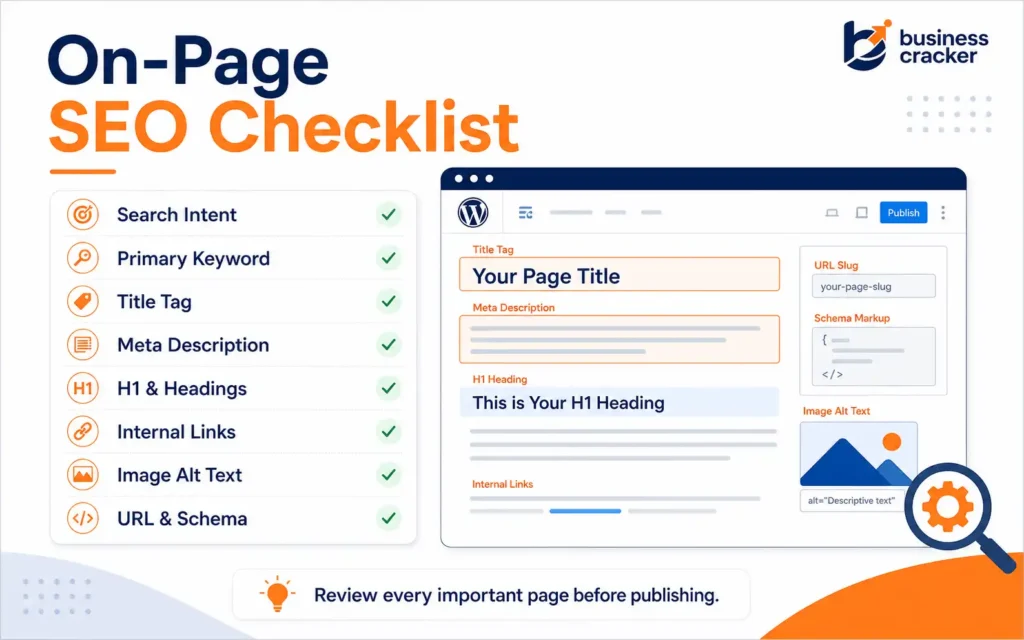
1. Confirm the Search Intent Before Writing or Editing
Do not start with the keyword. Start with the reason behind the keyword.
For example, someone searching “on page SEO checklist” may want:
- A step-by-step checklist
- A page audit process
- A beginner-friendly explanation
- A downloadable template
- A way to improve an existing page
- A process to brief content writers or developers
A business page should not try to satisfy every possible angle. It should choose the main intent and cover supporting questions naturally.
How to check search intent:
- Search the primary keyword manually
- Review the top-ranking pages
- Check whether results are guides, tools, service pages, videos, or templates
- Identify the common sections competitors include
- Look for missing practical examples
- Check People Also Ask questions
- Review forum discussions for real confusion
The goal is not to copy competitors. The goal is to understand what users expect before they click.
2. Assign One Primary Keyword to One Main Page
Every important page should have one primary keyword or one primary search intent.
For this article, the primary keyword is on-page SEO checklist.
Supporting keywords include:
Following the On-Page SEO Checklist helps you to avoid common mistakes that could hinder your site’s performance in search rankings.
An effective On-Page SEO Checklist should address title tags, meta descriptions, and proper heading structures, ensuring that every page serves its purpose.
Each section of this On-Page SEO Checklist can be tailored to fit specific industry needs, allowing for more effective optimizations.
- On-page SEO services
- SEO checklist
- website optimization
These supporting keywords should appear naturally where they make sense. They should not be forced into every section.
For business websites, this matters because service pages and blog posts often overlap. For example, one site may have:
- SEO services
- On-page SEO services
- SEO audit services
- SEO checklist blog
- Website optimization guide
If each page targets the same intent, the site may compete with itself. That is keyword cannibalization.
With the guidance of an On-Page SEO Checklist, businesses can systematically improve their web pages to achieve better rankings.
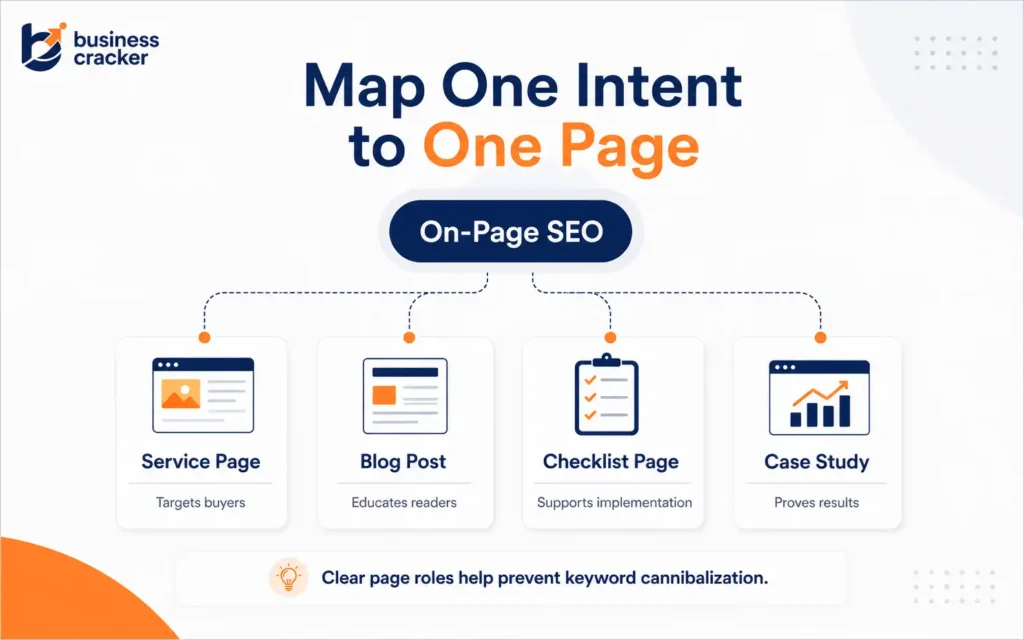
Fix it by mapping pages clearly:
Reviewing your content against an On-Page SEO Checklist can reveal areas for enhancement that may lead to increased traffic.
- Service page: targets buyers who need help
- Blog post: educates users and links to the service page
- Checklist page: supports implementation
- Case study: proves results
- FAQ page: answers objections
Each page should have a clear job.
3. Check for Keyword Cannibalization
Before optimizing a page, check whether another page already targets the same keyword or intent.
Search Google using:
site:yourdomain.com “target keyword”
Also, check Search Console for pages receiving impressions for the same query.
If two or more pages are competing, decide whether to:
- Merge them
- Rewrite one for a different intent
- Canonicalize one page
- Add stronger internal links to the preferred page
- Redirect the weaker page if it has no unique value
In recent SEO community discussions, cannibalization continues to appear as a major issue for publishers and business sites. The common problem is not just duplicate wording. It is several pages having similar relevance for the same topic, which makes it harder for Google to decide which page should rank.
Do not publish five weak pages when one strong page would serve the user better.
4. Write a Title Tag That Matches the Page Intent
The title tag is still one of the most important on-page elements. It helps users understand the page in search results and gives search engines a strong topic signal.
A good title tag should:
- Include the primary keyword naturally
- Match the page content
- Be specific
- Avoid keyword stuffing
- Avoid generic wording
- Differentiate the page from similar pages
- Make sense without the brand name
Example for this article:
On-Page SEO Checklist for Business Websites
This title is direct. It includes the primary keyword and tells the reader who the content is for.
Google’s title link documentation says Google uses several sources to create title links, including the title element, main visual title, headings, and other prominent text. It also notes that unclear or competing headings can cause Google to generate a different title link.
So, title optimization is not only about the title tag. The title tag, H1, and visible page title should support the same idea.
5. Write a Meta Description That Helps the Click
A meta description is not a direct ranking shortcut. Its main job is to help the searcher understand what the page offers.
Google says it may use the meta description when it gives users a more accurate description than page content alone. Google also recommends unique descriptions for each page and warns that keyword-stuffed descriptions are less likely to be useful.
A good meta description should:
- Summarize the page accurately
- Include the primary keyword if it fits naturally
- Explain the benefit of reading
- Avoid exaggerated claims
- Avoid repeating the title word-for-word
- Be unique for each important page
Example:
Use this on-page SEO checklist to review titles, headings, content, internal links, images, URLs, and page experience before publishing business pages.
That description tells the reader exactly what they will get.
6. Use One Clear H1
The H1 should tell users what the page is about. It should not be hidden, empty, duplicated, or replaced by a generic banner heading.
For this article, the H1 is:
On-Page SEO Checklist for Business Websites
That works because it matches the primary search intent.
The 2025 Web Almanac found that H1 elements were present on about 71 percent of desktop pages and 70 percent of mobile pages, while non-empty H1s appeared on about 66 percent of pages. That means a meaningful H1 is still missing on a noticeable share of pages.
For business websites, check these common H1 mistakes:
- No H1 on the page
- More than one H1 is used without a reason
- H1 says only “Services” or “Welcome.”
- H1 does not match the title tag
- H1 is styled visually but not marked up as an H1
- Page builder creates empty heading tags
A clear H1 helps both the reader and the page structure.
7. Use Headings to Build a Logical Page Structure
Headings are not only design elements. They organize the page.
A good heading structure helps users scan the page and helps crawlers understand the relationship between sections. The 2025 Web Almanac notes that headings map the logical flow of a page and guide both readers and crawlers through the main ideas.
Use headings like this:
- H1: Main page topic
- H2: Major sections
- H3: Supporting points under each section
- H4: Use only when needed for deeper structure
Avoid:
- Using headings only for font size
- Skipping from H2 to H5 without logic
- Repeating the same keyword in every heading
- Making every line a heading
- Creating empty heading tags through page builders
For a service page, a simple structure may look like this:
- H1: SEO Services for Business Growth
- H2: Service Overview
- H2: Problems We Solve
- H2: What Is Included
- H2: Our SEO Process
- H2: Why Work With Us
- H2: Frequently Asked Questions
- H2: Contact Us
For a blog post, headings should follow the reader’s questions in order.
8. Cover the Topic Completely, Not Mechanically
A common mistake is treating on-page SEO as keyword placement. Add the keyword in the title, H1, first paragraph, and a few headings. Then stop.
That is not enough.
Incorporating an On-Page SEO Checklist into your workflow can streamline the optimization process, making it easier to maintain high standards across your website.
Google’s helpful content guidance asks whether the content provides original information, reporting, research, or analysis, and whether it gives a substantial, complete, or comprehensive description of the topic.
For a business page, useful content should answer:
- What is the service or topic?
- Who is it for?
- What problem does it solve?
- What is included?
- How does the process work?
- What should the reader do next?
- What makes the solution credible?
- What mistakes should the reader avoid?
- What questions does the reader have before converting?
For a blog post, useful content should answer:
- What is the concept?
- Why does it matter?
- How does it work?
- What are the steps?
- What examples make it clear?
- What tools or checks help?
- What should the reader fix first?
Good on-page SEO is no longer content by default. It is complete content for the specific intent.
9. Use Keywords Naturally
The primary keyword should appear in important places, but the page should not read like it was written for a crawler.
Use the primary keyword in:
- Title tag
- H1
- Introduction
- One or two H2s if natural
- Meta description
- URL slug
- Image alt text only if relevant
- Conclusion or CTA if natural
Use supporting keywords where they fit.
This On-Page SEO Checklist is essential for marketers who want to ensure their content is optimized for search visibility.
For this article:
- On-page SEO checklist
- On-page SEO services
- SEO checklist
- Website optimization
Bad usage:
“Our on-page SEO checklist helps with on-page SEO checklist needs for businesses looking for on-page SEO checklist support.”
Good usage:
“This on-page SEO checklist helps business teams review titles, headings, internal links, images, and other website optimization elements before publishing.”
Search engines understand related terms. Readers notice repetition faster than algorithms reward it.
10. Add Internal Links With Descriptive Anchor Text
Internal links help users move to related pages and help search engines understand which pages matter.
Google’s link guidance says good anchor text should be descriptive, concise, and relevant to both the current page and the page being linked to. It also says every page you care about should have a link from at least one other page on your site.
For this blog, two internal links are important:
- Link to the SEO service page using the anchor text on page SEO services
- Link to the homepage using the anchor text digital marketing services
Do not use generic anchors like:
- click here
- read more
- this page
- learn more
Use anchors that make sense even when read alone.
Examples:
- Technical SEO services
- SEO audit support
- On-page SEO services
- Digital marketing services
- Website optimization strategy
Internal links should be helpful, not forced. Place them where the topic naturally supports the next step.
11. Add External References Where They Improve Trust
External links are useful when they support a claim, explain a standard, or give the reader a credible reference.
For this article, good external references include:
- Google Search Central SEO Starter Guide
- Google documentation on meta descriptions
- Google documentation on links
- HTTP Archive Web Almanac SEO chapter
Do not add external links just to look authoritative. Add them where the reader needs proof or deeper context.
For example, when discussing meta descriptions, link to Google’s snippet documentation. When discussing title tags, link to Google’s title link documentation. When mentioning recent title, meta, and heading data, link to the Web Almanac SEO chapter.
12. Optimize the URL Slug
The URL should be short, readable, and close to the primary keyword.
Good slug:
/on-page-seo-checklist/
Weak slug:
/blog/post?id=1234
Too long:
/complete-on-page-seo-checklist-for-business-websites-and-marketers-in-2026/
For WordPress websites, use lowercase words and hyphens. Avoid dates unless the topic is date-specific. If the article will be updated every year, a clean evergreen slug is usually better.
13. Add Image Alt Text That Describes the Image
Image alt text helps accessibility and can help search engines understand image content.
Good alt text describes the image accurately.
Examples:
- “On-page SEO checklist showing title tags, headings, internal links, and image optimization”
- “Website optimization workflow for business service pages”
- “SEO checklist for reviewing a WordPress blog post before publishing”
An On-Page SEO Checklist can be essential for tracking progress and identifying ongoing opportunities for optimization.
Avoid:
- Keyword stuffing
- Empty alt text on important images
- Repeating the article title for every image
- Writing alt text that does not match the image
If the image is decorative, it may not need descriptive alt text. If it explains a process, chart, checklist, or example, write useful alt text.
14. Add Schema Only When It Matches Visible Content
Schema can help search engines understand the page, but it should not be used to misrepresent content.
For this article, possible schema types include:
- Article schema
- Breadcrumb schema
- FAQ schema if FAQs are visible on the page
For service pages, possible schema types may include:
- Service schema
- Organization schema
- LocalBusiness schema if local targeting is relevant
- FAQ schema if FAQs are visible
Do not add FAQ schema for questions that users cannot see on the page. Do not add fake ratings or review markup. Schema should describe the page, not decorate it.
15. Review Page Experience
On-page SEO is not only text. If the page loads slowly, shifts while loading, or is hard to read on mobile, users may leave before engaging.
Google’s page experience documentation says its ranking systems look at several signals aligned with overall page experience. It also says Core Web Vitals are used by ranking systems, while noting that good scores alone do not guarantee top rankings.
Review:
- Mobile readability
- Font size
- Button spacing
- Image size
- Layout shifts
- Intrusive pop-ups
- Slow scripts
- Large banners
- Contact form usability
- Above-the-fold content
For business websites, page experience affects both search and conversion. A page that ranks but does not convert still has a business problem.
16. Update Existing Pages Before Publishing More
Many teams publish new content because it feels productive. But the faster win is often improving pages that already have impressions.
Check Google Search Console for pages that:
- Rank between positions 4 and 15
- Have high impressions but low CTR
- Have outdated titles
- Have weak meta descriptions
- Have thin sections
- Lack internal links
- Rank for queries not covered properly on the page
A recent digital marketing community discussion made the same practical point: if a business wants SEO movement quickly, improving pages already ranking in positions 4 to 15 can be more useful than chasing brand new topics. The suggested fixes included title tags, meta descriptions, H1s, and internal links.
This is often where on-page SEO creates visible movement.
17. Add a Clear CTA
Every business page and commercial blog should have a next step.
The CTA should match the reader’s stage.
For an educational blog, a soft CTA works better than a hard sales pitch.
Example:
If your website has pages that receive impressions but do not earn clicks or leads, review the title, headings, content structure, and internal links first. For a page-level review or SEO improvement plan, contact Business Cracker.
That is clear, relevant, and aligned with the article.
Common On-Page SEO Mistakes
Mistake 1: Optimizing for Keywords Before Intent
A page can include the keyword and still miss the search intent. If the SERP is full of checklists and your page is a sales page, it may struggle. If the SERP is full of service pages and your content is only informational, it may attract visitors who are not ready to convert.
Mistake 2: Reusing the Same Meta Description
Many business websites use the same meta description across service pages. This weakens clarity. Each page should have its own description based on its specific value.
Mistake 3: Treating Headings as Design Elements
Headings should structure the page. If the page builder uses H2s for styling cards, testimonials, or decorative text, clean it up.
Mistake 4: Ignoring Internal Links
A page with no internal links pointing to it is harder for users and crawlers to find. Internal links also help define page importance.
Mistake 5: Publishing Similar Pages Without a Content Map
Before creating a new page, check whether the topic already exists. If it does, improve the existing page or create a clearly different page for a different intent.
Mistake 6: Writing for Search Engines Only
A page that reads unnaturally will not build trust. The page should answer the user’s question better than competing pages.
A Simple On-Page SEO Workflow
Use this workflow for every important business page.
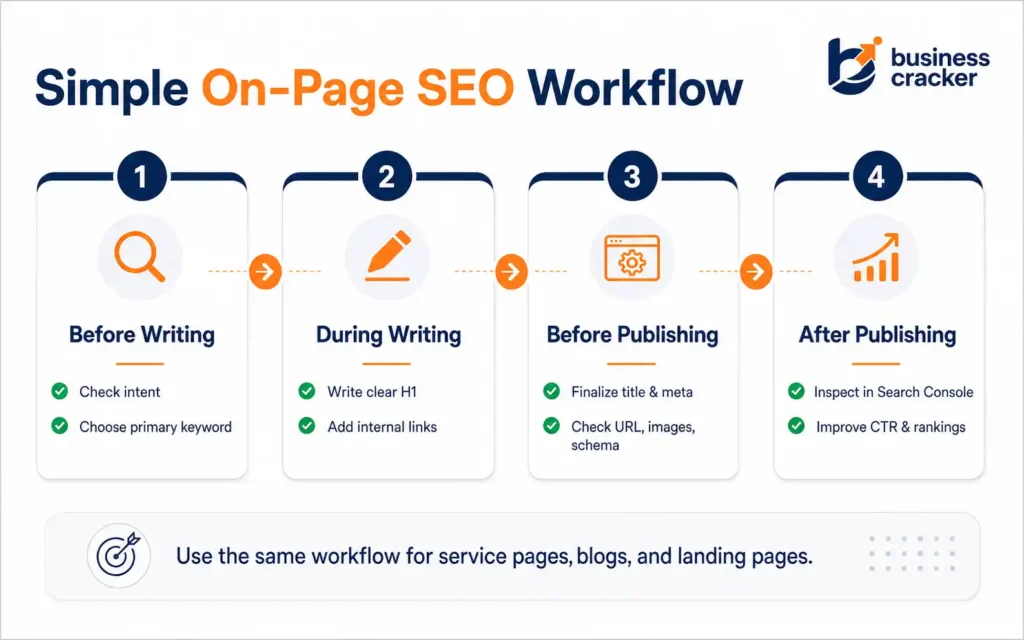
Before Writing
- Choose one primary keyword
- Review search intent
- Check competing pages on your site
- Decide the page type
- Plan internal links
- Prepare the page outline
During Writing
- Write a clear H1
- Use logical H2s and H3s
- Cover the topic completely
- Add examples
- Use the keyword naturally
- Add internal and external links
- Write for the reader first
Before Publishing
- Write the title tag
- Write the meta description
- Check URL slug
- Add image alt text
- Preview mobile layout
- Check links
- Add schema if relevant
- Submit the page in the sitemap
After Publishing
- Inspect the URL in Search Console
- Track impressions and CTR
- Check ranking queries
- Add internal links from older pages
- Update content based on real query data
- Improve pages stuck on page 2 or 3
Final Thoughts
On-page SEO is not a one-time task or a simple keyword checklist. It is the process of making each page clear, useful, and connected to the rest of the website.
For business websites, the priority should be practical. Match the page to one intent, write a clear title and H1, structure the content properly, add helpful internal links, support the page with useful references, and review performance in Search Console.
A good SEO checklist does not replace strategy. It prevents avoidable mistakes. When applied consistently, it helps every service page, blog post, and landing page work harder for search visibility and lead generation.
Using an On-Page SEO Checklist ensures that all necessary elements are considered before launching a new page.